v2.0 — Now with AI Insights for Mac & Windows

Your computer,
intelligently optimized

CleanAgent uses machine learning to analyze your system, find what's actually slowing it down, and fix it — safely, with one scan. Completely free.

cleanagent — analysis
0
Performance Score
0 GB
Avg. Space Recovered
0s
Avg. Scan Time
2
Platforms (Mac + Win)

Not just another cleaner.
An AI that understands your system.

Traditional cleaners delete files blindly. CleanAgent analyzes usage patterns, system metrics, and file relationships to make intelligent optimization decisions.

🧠

AI Insights Panel NEW

After every scan, the AI engine generates prioritized recommendations ranked by severity — critical, high, medium — with one-click auto-fix for most issues.

🗑️

Smart Cache Cleanup

Targets browser caches, system logs, and app caches intelligently. Knows which caches are safe to remove and which ones your apps actively need.

🔍

Duplicate Finder

Uses file hashing to find true duplicates across Downloads, Documents, and Desktop. Shows you exactly what's wasting space before deleting anything.

Memory Optimization

Identifies memory-hogging processes and purges inactive memory. Frees up RAM so your apps run smoothly without manual process management.

📊

System Reports

Generates detailed performance reports with CPU, memory, and disk breakdowns. Track improvements over time and share reports if needed.

🛡️

Safe by Design

Every cleanup operation requires confirmation. Never touches system-critical files. Always shows you exactly what will be removed before acting.

Three steps to a faster machine

01

Scan

CleanAgent runs a comprehensive analysis of your system — caches, large files, duplicates, downloads, startup items, and memory usage.

02

AI Insights

The AI engine evaluates findings and surfaces an Insights panel with prioritized recommendations — critical issues first, with auto-fix badges on items CleanAgent can resolve in one click.

03

Optimize

Approve the cleanup with one command. Browser caches, old logs, trash, DNS cache, and inactive memory are cleaned safely and instantly.

This is what it looks like
running on your machine

CleanAgent runs as a local web app in your browser. No cloud, no accounts — just open it and scan. Here's what you'll see.

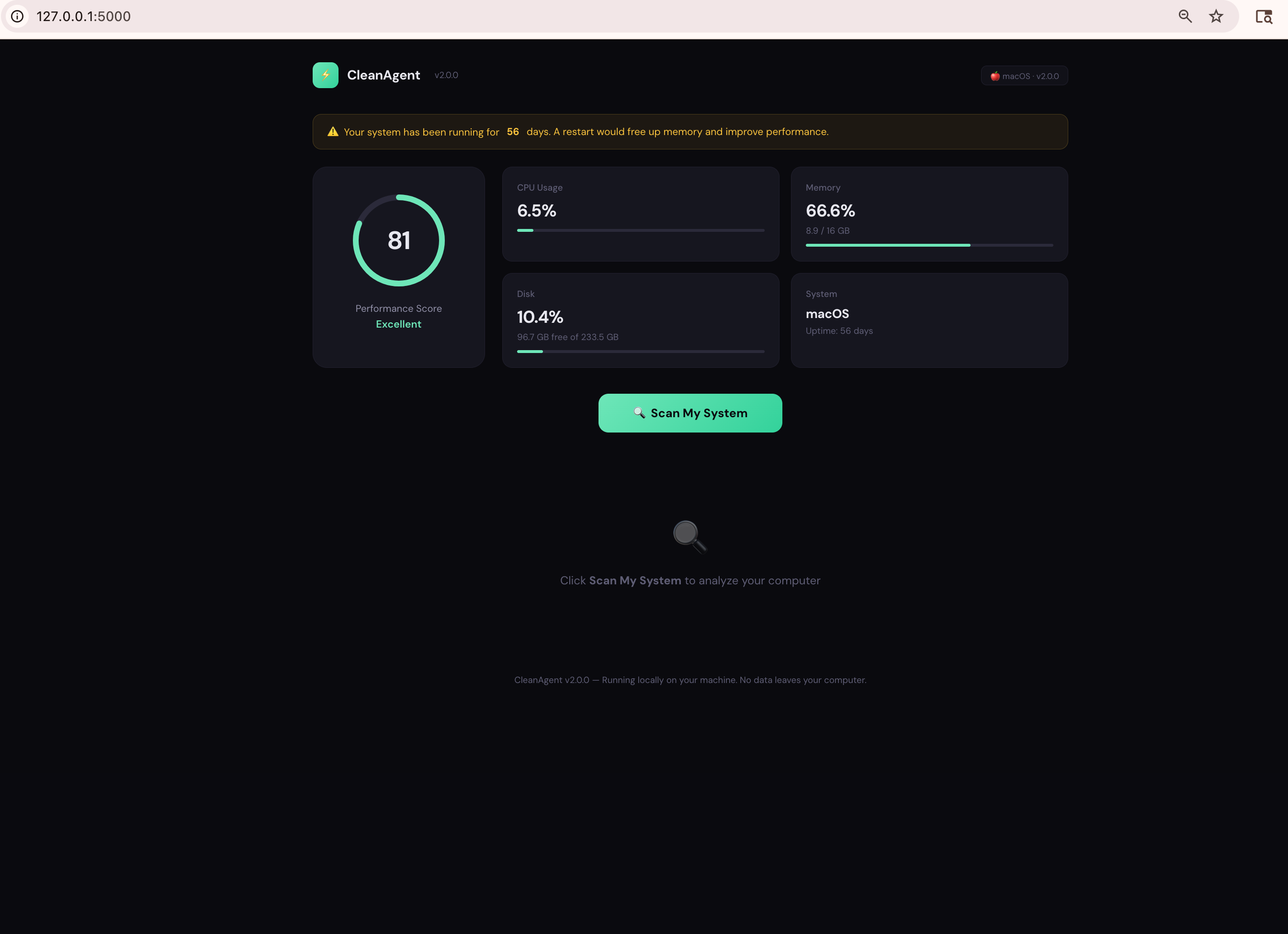
CleanAgent dashboard showing performance score, CPU, memory, and disk metrics

System Dashboard

Real-time performance score with CPU, memory, and disk metrics — all collected locally on your machine.

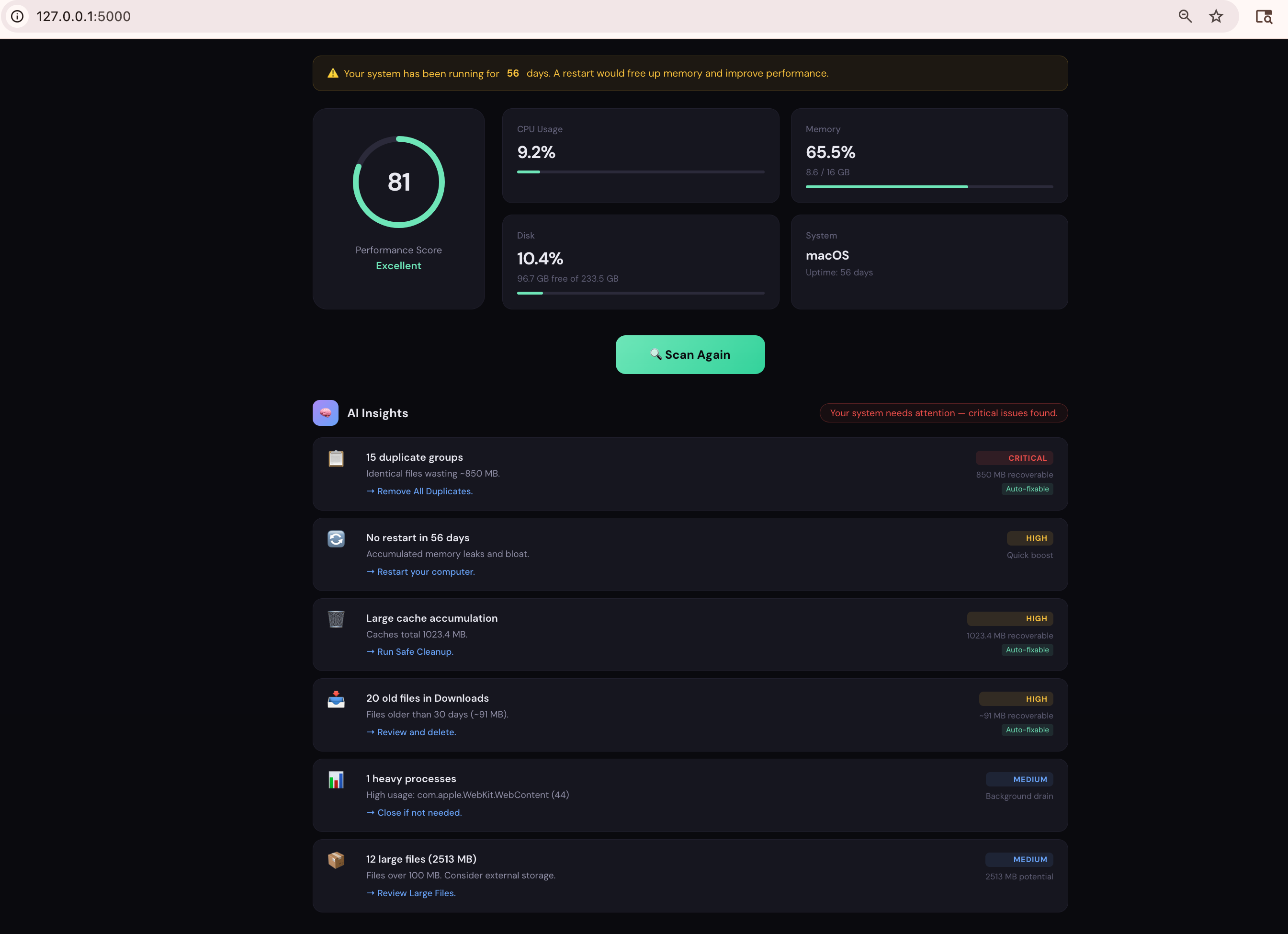
AI Insights panel showing prioritized recommendations

AI Insights Panel

After each scan, the AI engine ranks issues by severity — critical, high, medium — with auto-fix badges on items it can resolve in one click.

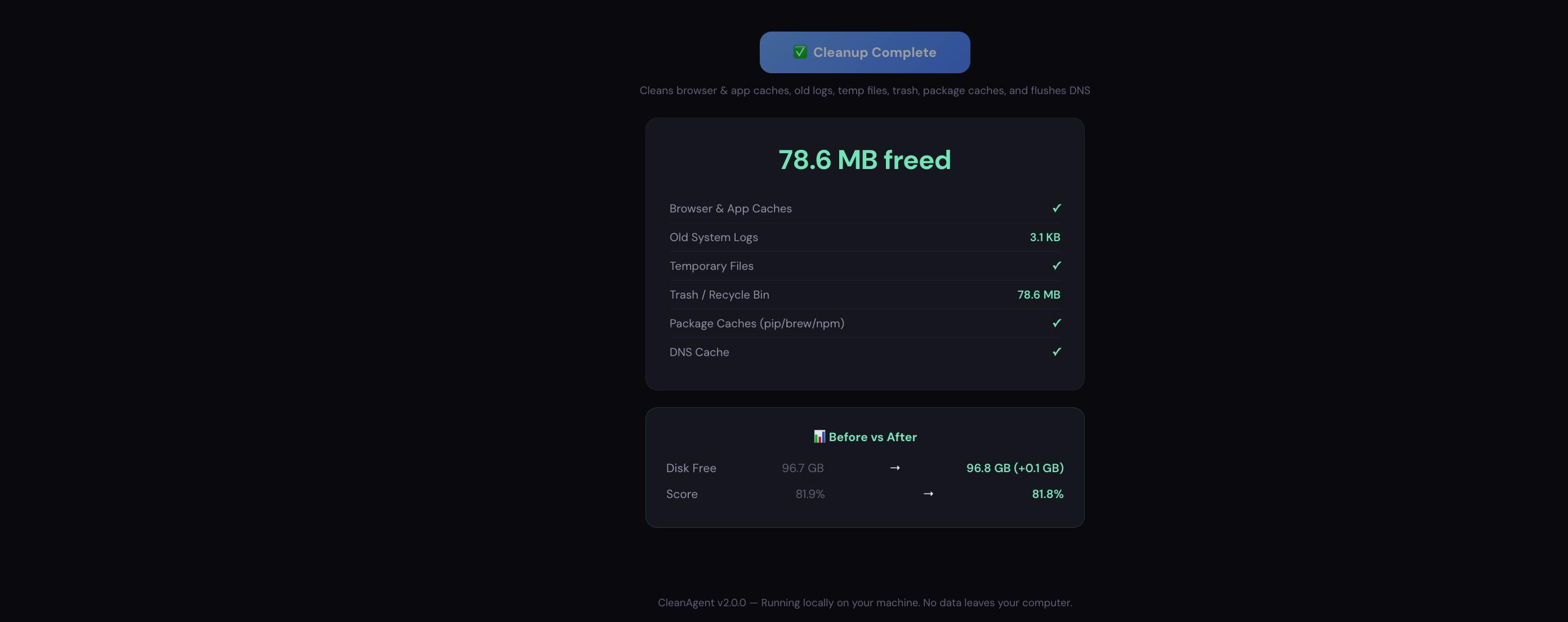
Cleanup results showing space freed and before/after comparison

Cleanup Results

See exactly what was cleaned and how much space was freed, with a before-vs-after comparison of your disk and score.

It started with 8.6 GB of junk and a guilty conscience

I build software for a living. My own Mac was begging for help. I ignored it for months.

Here's the embarrassing truth: I'm an engineer who works with cloud infrastructure all day — and my personal laptop was choking on 8.6 GB of old caches, duplicate downloads, and forgotten files from 2023. I knew exactly how to fix it. I just... didn't.

Sound familiar? One day my fan started screaming during a video call. I finally looked. Chrome cache alone was 2 GB. I had the same Zoom recording saved in three different folders. My Downloads folder was a graveyard of PDFs I opened once a year ago.

Then I thought about the people around me — parents who ask "why is my laptop so slow?", grandparents who are afraid to click the wrong thing, friends who don't know what a cache file is and shouldn't have to. They're not going to open Terminal. They just want their computer to work.

So I built CleanAgent. Not a business plan first — a weekend project that actually solved my own problem. One scan, plain-English recommendations, one-click cleanup. No subscription, no account, no data leaving your machine. The kind of tool I wished existed before I spent an evening manually deleting cache folders.

Your computer is personal — what's on it, what you browse, what you download. Nobody else needs to see that. CleanAgent is free because cleaning your own computer shouldn't cost money. It's private because your data is yours. And it's honest — if your system is already clean, it'll tell you so.

— The creator of CleanAgent
🔒

Your Data Never Leaves Your Computer. Period.

No servers. No accounts. No analytics. No telemetry. Not even an internet connection required. CleanAgent scans, recommends, and cleans — all on your machine, all offline.

👀

Every Line of Code Is Public

The app is built automatically on GitHub's public infrastructure. You — or anyone you trust — can inspect exactly what goes into the binary you download. No hidden surprises.

🛡️

Honest Results, Not Scare Tactics

Other cleaners show inflated red warnings to make you panic-buy a subscription. If your system is healthy, CleanAgent says "you're good." No fake threats, no dark patterns.

👨‍👩‍👧‍👦

Built for the People Who Call You for Tech Support

Your mom, your dad, your neighbor who "isn't good with computers." One scan, clear recommendations in plain English, safe cleanup. If they can use a web browser, they can use CleanAgent.

How we stack up

We built CleanAgent to be the tool we wished existed — powerful, transparent, and fairly priced.

Feature CleanAgent Typical Mac Cleaner Typical PC Cleaner
AI Insights & recommendations ✓ Prioritized
Mac + Windows Mac only
Free tier 100% free Limited trial Limited free
Performance scoring ML-based Basic
Duplicate finder Hash-based
Data collection None — fully local Some telemetry Some telemetry
Price Completely free ~$40/yr ~$30/yr

Ready to speed up your machine?

Download CleanAgent and run your first scan in under 60 seconds. No signup, no payment, no catch.

🍎

macOS

v2.0.0 · ~15 MB
Download .dmg
Requires macOS 10.15+ · Apple Silicon & Intel
First launch: Right-click → Open
🪟

Windows

v2.0.0 · ~20 MB
Download .exe
Requires Windows 10/11 (64-bit)
First launch: Click "More info" → "Run anyway"

Common questions

Is CleanAgent safe to use? +
Every cleanup operation shows you exactly what will be deleted before proceeding. CleanAgent never touches system-critical files, application data, or your personal documents. It only targets caches, temporary files, and logs that are safe to remove.
Will it delete my saved passwords? +
No. CleanAgent only cleans browser cache files (temporary images, scripts, stylesheets). Passwords are stored separately in your browser's credential store or keychain, which we never touch.
How is this different from other cleaners? +
Three key differences: CleanAgent works on both Mac and Windows, v2.0 includes an AI Insights panel that generates prioritized recommendations after every scan (critical → high → medium), and the core features are completely free. Most popular Mac cleaners are single-platform and start at $30–40/year for basic functionality.
Does it collect my data? +
No. CleanAgent runs entirely on your local machine. No data is sent to any server. The ML analysis happens locally using lightweight models bundled with the app. Your system data never leaves your computer.
Will it always be free? +
Yes — v2.0 is completely free with all features included, including the new AI Insights panel. No trial limits, no feature gates, no hidden costs. We may introduce optional premium features in the future, but the core optimizer will always remain free.